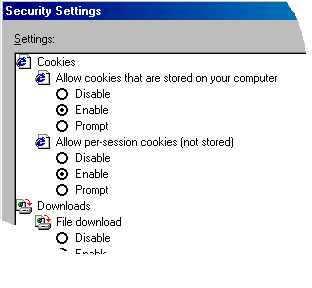
- On your PC, go to
 /
Settings / Control Panel /
Settings / Control Panel
- Find the Internet
Options icon and double click it
- Click the Privacy tab.
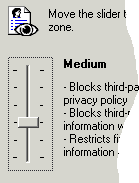
- You should either see a
slider similar to the one pictured to the right, or the word custom (if you see the
word custom, follow the instructions for advanced users instead).
- By default, this should be set to medium, if it is all the way at the top,
move it down until the word medium is displayed, as this is the highest level
that will allow you to log into the AccuBar website.
- Click OK
- Close all open browser windows, and restart Internet Explorer.
Instructions for Advanced Users
- On your PC, go to /
Settings / Control Panel
- Find the Internet
Options icon and double click it
- Click the Privacy tab.
- Click the Advanced button.
- Check Override automatic cookie handling
- Click Accept under First
party Cookies
- Click Accept under Third party Cookies
- Check Always allow session cookies
- Click OK out of Internet Options
- Close all open browser windows, and restart Internet Explorer.
Alternatives for those who require medium-high or high
privacy options
- In the Privacy tab, click the Edit button
- In the Address of Web Site box, type in http://www.accubar.net then click
Allow. This will enable all servers in the www.accubar.net domain to set and read
cookies unless you have the privacy settings explicitly set to block or allow
all cookies.
- Click OK out of Internet Options
- Close all open browser windows, and restart Internet Explorer.
|
 |